Rust + Vim + IRC

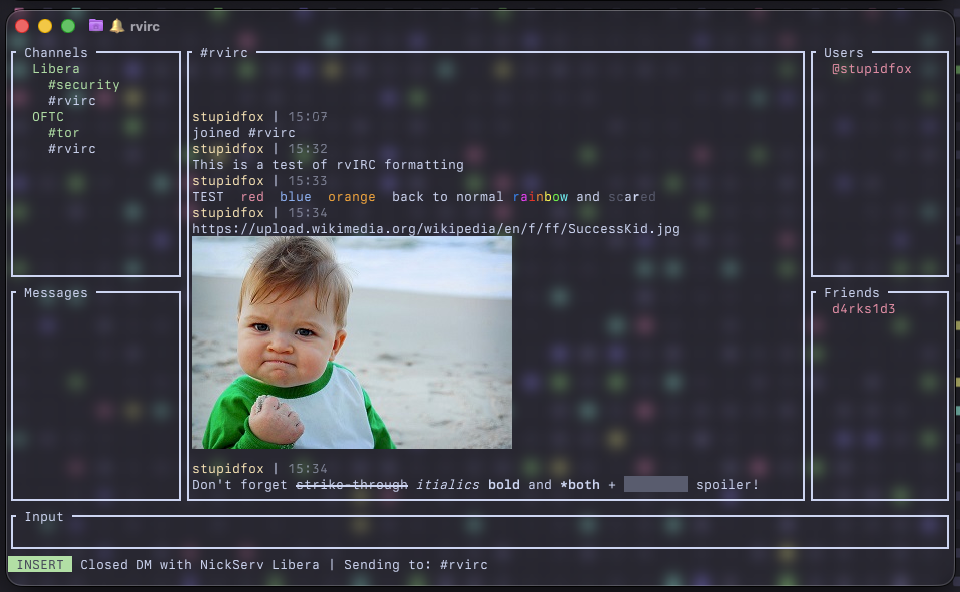
A terminal IRC client with vim-style modes, full IRCv3 support, encrypted DMs, inline images, and more.

IRCv3 Compliant Vim Modes E2E Encrypted DMs Multi-Server
$ cargo build --release && ./target/release/rvirc

rvIRC screenshot

Features

Everything you need in a modern terminal IRC client.

⌨️

Vim-Style Modes

NORMAL, INSERT, and COMMAND modes with distinct status bar colors. Navigate like you would in Vim — i to type, : for commands, Esc to return.

🌐

Multi-Server

Connect to multiple IRC servers simultaneously. The channels pane groups everything by server. Switch between servers and channels seamlessly.

🔒

Encrypted DMs

End-to-end encrypted direct messages using X25519 key exchange and ChaCha20-Poly1305 encryption. TOFU key pinning and SAS verification built in.

📁

File Transfer

Send and receive files via magic-wormhole relay. Accept/reject popups, in-chat progress, and built-in file browser. Works inside encrypted DM sessions.

🖼️

Inline Images

Image URLs render inline in chat via Sixel, Kitty, or iTerm2 protocols. Animated GIF support included. Works inside encrypted DMs too.

🔔

Notifications

Desktop notifications and optional sound for unviewed buffers. Highlight words trigger mention-style alerts. :mute / :unmute to control.

👥

Friends List

Track nicks with MONITOR. Green = online, yellow = away, red = offline. Presence updates in real time via away-notify and extended-monitor.

🔄

Auto-Reconnect

After unexpected disconnect, retries up to 3 times with exponential backoff (5s, 15s, 30s). Manual :connect or :quit cancels.

🎨

IRC Formatting & Effects

Bold, italic, strikethrough, colors, spoilers — all rendered. Plus rvIRC-exclusive @@rainbow@@ and $$scared$$ text effects.

🔍

Search & Superlist

:search opens a filterable popup over the current buffer. :superlist fetches channel lists from all servers in one combined view.

✏️

Message Editing

Press e to enter edit-select mode — your recent messages are numbered in yellow. Pick one to open an edit popup, modify, and send.

↩️

Threaded Replies & Reactions

Press r to reply to a message. React with emoji via :react. Reactions display inline below the target message.

IRCv3 Capabilities

Full coverage of the IRCv3 specification — stable, draft, and client tags.

Stable Capabilities — 17 caps

CapabilityWhat rvIRC Does
saslSASL PLAIN and EXTERNAL authentication
multi-prefixShows all mode prefixes per nick (e.g. @+nick)
away-notifyFriends pane updates in real time as nicks go away/return
account-notifyTracks nick→account mapping changes
account-tagShows account name alongside messages
extended-joinAccount name and real name on JOIN
invite-notifyNotifies when someone else is invited to your channel
chghostUpdates ident@host cache on host changes
cap-notifyHandles dynamic CAP NEW/DEL
userhost-in-namesStores full user@host from NAMES reply
server-timeDisplays server-provided timestamps on all messages
message-tagsFull tag support: typing, reactions, replies, bot flags
batchChathistory batches; netsplit/netjoin collapsed to one line
echo-messageServer echoes sent messages for correct msgids
labeled-responseTags requests to correlate responses
standard-repliesColor-coded FAIL / WARN / NOTE labels
setnameChange your real name; display others' changes

Working Group / Draft Capabilities — 13 caps

CapabilityWhat rvIRC Does
monitorBase presence monitoring for the friends list
extended-monitorExtended MONITOR for friend presence tracking
draft/chathistoryFetches last N messages on join; :more / :history for older
draft/read-markerSends MARKREAD on buffer switch; syncs across clients
draft/multilineMulti-line pastes sent as a single batch
draft/pre-awayAWAY sent before CAP END on reconnect
draft/no-implicit-namesSuppresses automatic NAMES on JOIN
draft/channel-renameRENAME moves channel in all panes, preserves history
draft/message-redactionRedact messages; shows [Message redacted]
draft/message-editEdit messages via EDIT command with (edited) marker
draft/message-deleteDelete messages; shows [Message deleted]
draft/account-registrationRegister accounts with :register
draft/extended-isupportEarly ISUPPORT; parses NETWORK and NETWORKICON

Client Tags — no cap negotiation required

Tag / SpecWhat rvIRC Does
+replyThreaded replies — r shows numbers on last 10 messages
+draft/reactEmoji reactions displayed inline below messages
+draft/channel-contextBot DMs with channel context appear in the channel buffer
+typingSends and displays typing indicators

ISUPPORT Tokens

TokenWhat rvIRC Does
UTF8ONLYShows notice when server enforces UTF-8
NETWORKNetwork name displayed on connect
NETWORKICONNetwork icon URL shown on connect
WHOXExtended WHO fetches account names
STSPersists TLS upgrade policies

Commands

Type : to enter COMMAND mode. Tab-completion works on command names.

Connection

:connect <name>Connect to a server by config name
:serversShow server list; pick one to connect
:reconnectReconnect to current server
:disconnectDisconnect from current server
:quit [msg]Disconnect all and quit

Channels & Messaging

:join #channelJoin a channel
:partPart current channel or close DM
:listFetch channel list (filterable)
:superlistChannel list from all servers
:msg <nick> <text>Send a private message
:me <action>Send a CTCP ACTION
:topic [text]Show or set channel topic
:invite <nick>Invite nick to channel
:channel #chanSwitch to a channel/DM
:clearClear current buffer

Users

:nick <name>Change your nickname
:away [msg]Set or clear away status
:whois [nick]Show whois popup
:kick <nick>Kick user from channel
:ban <mask>Set a ban mask
:ignore <nick>Locally hide all messages from nick
:add-friend <nick>Add to friends list (MONITOR)

Account

:pass <pw>Identify with NickServ
:register <email> <pw>Register a new account
:setname <name>Change your IRC real name

Message Actions

:replyEnter reply-select mode
:react <emoji>React to selected message
:edit <text>Edit your last message
:delete [msgid]Delete a message
:redact [msgid]Redact a message
:searchSearch current buffer
:moreFetch older messages

Encrypted DMs & Files

:secure [nick]Start encrypted DM session
:unsecure [nick]End encrypted session
:verify [nick]Show SAS verification code
:verified [nick]Mark peer as verified
:sendfile [nick] [path]Send file via wormhole

Metadata

:metadata listList your metadata keys
:metadata get <key>Get a metadata value
:metadata set <k> <v>Set a metadata key/value
:metadata clear [key]Clear metadata

UI & Other

:channel-panel show|hideToggle channels pane
:highlightManage highlight words
:notifications on|offToggle notifications
:capsShow negotiated IRCv3 caps
:raw <cmd>Send raw IRC command
Keybindings

Vim-style modes with familiar navigation.

NORMAL Mode

iEnter INSERT mode
:Enter COMMAND mode
rReply-select mode (cyan numbers)
eEdit-select mode (yellow numbers)
cFocus channels pane
mFocus messages pane
uFocus users pane
fFocus friends pane
k / jScroll up / down
PgUp / PgDnScroll by page
EscReturn focus to main

INSERT / COMMAND Mode

EnterSend message / execute command
EscReturn to NORMAL mode
/ Browse input history
TabTab-complete commands
Ctrl+ACursor to start
Ctrl+ECursor to end
Ctrl+WDelete word left
Ctrl+UDelete to start of line
Ctrl+KDelete to end of line

Pane Navigation

k / jMove selection up / down
EnterSwitch to selected item
EscUnfocus pane

Edit Popup

EnterSend edited message
EscCancel edit
/ Move cursor
Home / EndJump to start / end
BackspaceDelete character left
DeleteDelete character right

Configuration

All config lives in ~/.config/rvIRC/.

FileContents
config.tomlMain config — servers, nickname, preferences
identity.tomlPersistent X25519 identity keypair (auto-generated)
known_keys.tomlTOFU key store — peer identity keys, verification status
friends.tomlFriends list (nicks to MONITOR)
highlight.tomlHighlight word list
read_markers.tomlPer-buffer read position
sts.tomlPersisted STS upgrade policies
~/.config/rvIRC/config.toml
username = "myuser"
nickname = "mynick"
real_name = "My Name"
# alt_nick = "mynick_"            # fallback nick if primary is in use
# download_dir = "~/Downloads/"   # default save directory for files
# render_images = true            # inline image display (default: true)
# offline_friends = "show"        # "show" or "hide" offline friends
# notifications = true            # desktop notifications (default: true)
# sounds = true                   # terminal bell (default: true)

[[servers]]
name = "Libera"
host = "irc.libera.chat"
port = 6697
tls = true
# identify_password = "your_password"   # NickServ or SASL password
# sasl_mechanism = "plain"              # "plain" or "external"
# auto_connect = "yes"                  # connect on startup
# auto_join = "#rvirc, #rust"           # join after identify
# proxy_url = "socks5://127.0.0.1:1080" # SOCKS5 proxy

[[servers]]
name = "Hackint"
host = "irc.hackint.org"
port = 6697
tls = true

Encrypted DMs

End-to-end encryption that works transparently over standard IRC.

Key Exchange

Fresh ephemeral X25519 keypairs generated per session. DH shared secret expanded via HKDF-SHA256 into directional keys (rvIRC-dm-init / rvIRC-dm-resp).

Encryption

ChaCha20-Poly1305 AEAD cipher with directional keys. Each side uses a different key to prevent (key, nonce) reuse. Monotonically increasing nonces for replay protection.

TOFU

Peer identity keys stored in known_keys.toml with fingerprint, verification status, and timestamps. Key changes trigger a red warning and block the handshake.

SAS Verification

6-word Short Authenticated String derived from DH secret + both identity keys. Compare out-of-band with your peer, then :verified to mark as trusted.

Persistent Identity

X25519 keypair in identity.toml (0600 permissions). Used for TOFU and SAS — not for DH exchange, so forward secrecy is preserved.

Workflow

:secure → accept popup → key exchange → encrypted chat (🔒 in channel list) → :verify → compare codes → :verified (✔ marker).